
Bash
Two things in one role.
It's the bash shell role: unix includes it when the host's login shell is bash (unix_shell == bash), to apply the bash-specific login-file hygiene. Bash reads ~/.profile (where unix wires the framework), so this removes ~/.bash_profile so it can't shadow it. The zsh role is its counterpart.
It's also the shared alias/script generator: reusable task files (aliases.yaml, record-version.yaml, scripts.yaml) that other roles import with tasks_from to generate shell aliases, install scripts, and record tool versions. This part is shell-agnostic (aliases and functions are POSIX) and is used on every host regardless of unix_shell.
Shell startup
The files this role generates live under ~/.profile.d/, which every interactive shell sources in order at startup. The unix role's init.sh loader prints a banner, then sources each *.sh fragment, logging each one as it loads:
┏━━━━━━━━━━━━━━━━━━┓
┃   dotfiles.pro   ┃
┗━━━━━━━━━━━━━━━━━━┛

  Loading:       ~/.profile.d/aliases.sh
  Loading:       ~/.profile.d/environment.sh
  Loading:       ~/.profile.d/ssh.sh
The banner text is set on the unix role (unix_init_header).
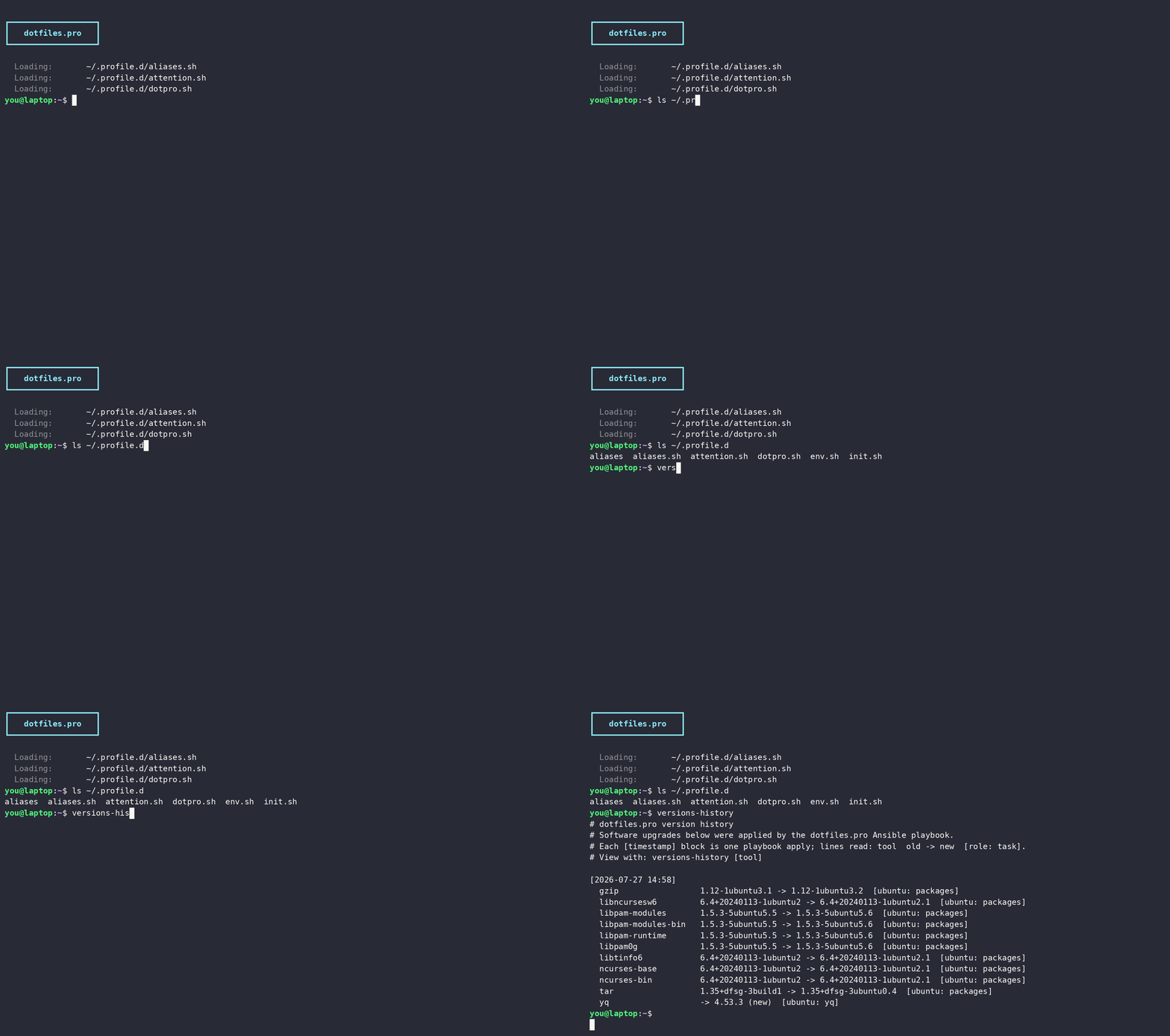
The version history doubles as a machine-level changelog an agent can consult, so "what changed here" questions get answered from the record instead of guesswork:
Did anything upgrade on this machine recently that could explain a broken build?Terminal attention
When you kick off a command and switch to another tab, desktop, or window, nothing tells you it failed until you look back. This role deploys two pieces that fix that.
~/scripts/notify is a shared, tool- and OS-neutral notifier, called with named arguments (notify [--app NAME] [--title TEXT] [--body TEXT] [--context TEXT] [--level …]). A generic notifier over three fields: a title (--title), the bold headline, defaulting to the active tab title notify reads from the terminal itself (Claude Code's own task summary); a body (--body), the line beneath; and context (--context), the dim attribution line, defaulting to the git branch led by a branch/worktree icon, then the active path in brackets (e.g. 🌱 main (~/projects/dotfiles)). --app NAME leads the headline as App: <title> while the toast sender stays "Terminal" (the host app, for its icon). notify <title> [body] [level] writes a bell + OSC 9 escape straight to the controlling terminal (portable, works over SSH; any OSC-9 terminal turns it into a background-visible toast), and then fires one native desktop notification for the host: a Windows toast on WSL through the interop bridge, Notification Centre on macOS (osascript), or libnotify on Linux (notify-send), so the ping reaches you even when the terminal isn't on screen. Backends are best-effort; a host with none (a headless box with no session bus) falls back to the terminal escape alone. Reading the tab title for the body is Windows-only; elsewhere the body is the explicit argument or empty. In Windows Terminal, an optional level (error red, warn yellow, ready green) also raises an OSC 9;4 attention ring on the very tab (and taskbar) that pinged, so it's findable on screen; notify --clear retires it when the session regains focus. On WSL with the windows role's terminal focus handler registered, the toast is also clickable: notify --clear --capture (wired to Claude Code's prompt-submit hook, the moment a session's window is provably foreground) records which Windows Terminal window hosts the session, and clicking a later toast brings that window up across virtual desktops and WT instances and selects the pinging tab (found by a title notify stamps on the tab at ping time, the only session-to-tab correlation WT allows). It lands in ~/scripts (on PATH) so both an interactive shell and a hook (the claude role's notification hooks call the same script) can reach it.
~/scripts/notify-codex is an adapter so OpenAI Codex pings ride the same notifier. Codex invokes its notify program with a JSON event; this translates that and re-invokes notify. Wire it by hand in ~/.codex/config.toml (the role doesn't manage that file) with an absolute path:
notify = ["/home/you/scripts/notify-codex"]The same pattern fits any tool that can run a command on an event: the notifier itself knows nothing about Claude or Codex.
~/.profile.d/attention.sh is a prompt hook that calls notify when a foreground command exits non-zero, naming the command (and painting the tab ring red). It hangs off PROMPT_COMMAND; under starship it runs from starship_precmd (which preserves the existing PROMPT_COMMAND and has already captured the real exit status), so it reads the right code with or without Starship. A fresh prompt clears any ring it raised.
Bash-specific: a zsh host would grow the same through a precmd hook in the zsh role; the notify script itself is shell-agnostic.
| Variable | Purpose |
|---|---|
bash_attention | Deploy the attention fragment (default true); false removes it on the next apply |
bash_attention_ignore_exit_codes | Exit codes that don't ping (default [130, 148]: Ctrl-C, Ctrl-Z); add 1 to silence routine non-zero exits from tools like grep/test |
bash_attention: true                       # default: true
bash_attention_ignore_exit_codes: [130, 148, 1]   # also ignore a no-match grep
aliases.yaml
Generates ~/.profile.d/aliases/<file>.sh from a Jinja2 template. Imported by any role that ships aliases:
- name: "Git aliases"
  ansible.builtin.import_role:
    name: bash
    tasks_from: aliases.yaml
  vars:
    bash_aliases_file: git                                # default: aliases
    bash_aliases: "{{ git_aliases }}"                     # default: {}
    bash_functions: "{{ git_functions | default({}) }}"
bash_completions: "{{ git_completions | default({}) }}"| Variable | Purpose |
|---|---|
bash_aliases_file | output filename under ~/.profile.d/aliases/ |
bash_aliases | dict of alias name → command |
bash_functions | dict of shell functions (optional) |
bash_completions | dict of completion definitions (optional) |
shell | host-level: the login shell (bash / zsh); selects how completions render |
Aliases and functions are POSIX and run under any shell, so they render the same everywhere. Completions are the one shell-specific output, appended to the same ~/.profile.d/aliases/<file>.sh: on bash they render as plain complete -F <function> <command> directives; on zsh the same registrations go through zsh's bashcompinit compatibility layer instead.
shell is a host-level variable (set in host_vars, not owned by any role, the same shape as the bare aliases / functions knobs), so the generator can read it without depending on another role. It defaults from the OS (zsh on macOS, bash elsewhere), and you override it for the off-diagonal (e.g. zsh on Linux). The zsh block guards itself twice: it runs only when compdef exists (meaning the zsh role brought up compinit), and each registration checks its completion function is defined: only functions this file defines exist in zsh, so git's bash-completion _git_* helpers are skipped rather than erroring.
scripts.yaml
Copies *.sh scripts into ~/scripts/ (with the .sh extension stripped).
| Variable | Purpose |
|---|---|
bash_scripts_src | source directory of *.sh scripts |
record-version.yaml
Appends a timestamped entry to ~/.versions.d/history.log, tracking a tool's version changes over time. Each line reads tool old -> new [role: task], the trailing tag naming the role and task that applied the upgrade (collapsed to [role] when the task equals the role).
| Variable | Purpose |
|---|---|
bash_record_version_name | tool name |
bash_record_version_old | previous version (empty for a new install) |
bash_record_version_new | new version |
bash_record_version_role | role that applied the upgrade (defaults to the calling role) |
bash_record_version_task | task within that role (defaults to the tool name) |
record-upgrades.yaml
Diffs two name version snapshots and appends every changed or new package to the history under the run's timestamp, in the same tool old -> new [role: task] format, so bulk apt/brew upgrades merge with the per-tool record-version.yaml entries.
| Variable | Purpose |
|---|---|
bash_record_upgrades_before | path to the "before" name version snapshot |
bash_record_upgrades_after | path to the "after" name version snapshot |
bash_record_upgrades_role | role that applied the upgrades (defaults to the calling role) |
bash_record_upgrades_task | task within that role (defaults to packages) |