
Starship
Installs Starship prompt and renders a configurable prompt config.
What it does
- Auto-installs and updates Starship to the latest GitHub release via the official installer script
- Registers
starshipin~/.versions.d/soversionsreports its version - Drops
~/.profile.d/starship.shto initialise Starship in the shell - Renders
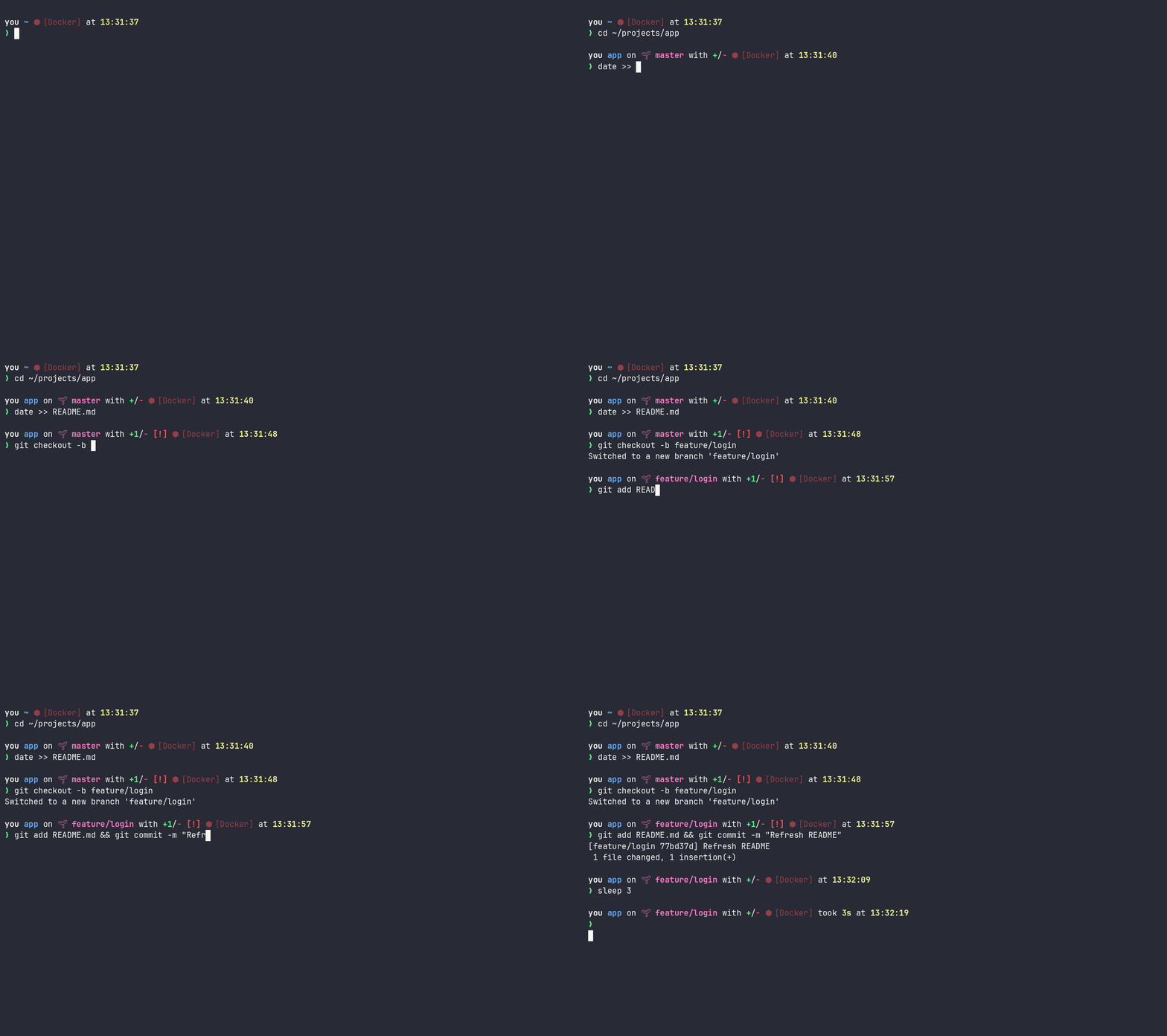
~/.config/starship.tomlfrom thestarship_configdict (Kubernetes, gcloud, DigitalOcean, AWS, Terraform, Docker, GitHub, GitLab, Sentry, Google Workspace, Grafana, and Helm context display) - Shows a source-branch glyph on the git branch and swaps it for a code-fork glyph inside a linked git worktree, mirroring the claude statusline so a worktree reads the same in prompt and statusline
- Shows which GitHub account/host the shell targets (
custom.github, read fromGH_CONFIG_DIR/GH_HOST), so the account gh will act on is visible and two shells on different accounts show different prompts - Shows which GitLab account/instance the shell targets (
custom.gitlab, read fromGLAB_CONFIG_DIR/GITLAB_HOST), so the account glab will act on is visible and two shells on different accounts show different prompts - Shows which Sentry account/instance the shell targets (
custom.sentry, read fromSENTRY_PROPERTIES), so the account sentry-cli will act on is visible and two shells on different accounts show different prompts - Shows which Google Workspace account the shell reads mail as (
custom.googleworkspace, read fromGOOGLE_WORKSPACE_CLI_CONFIG_DIR), so the mailbox gws will act on is visible and two shells on different accounts show different prompts - Shows which Grafana account the shell targets (
custom.grafana, read fromGCX_CONFIG), so the account gcx will act on is visible and two shells on different accounts show different prompts - Reads the same per-shell context variables the cloud, Kubernetes, GitHub, GitLab, Sentry, Google Workspace, and Grafana roles set (
CLOUDSDK_CORE_*,KUBECONFIG,KUBECTL_NAMESPACE,DIGITALOCEAN_CONTEXT,GH_CONFIG_DIR/GH_HOST,GLAB_CONFIG_DIR/GITLAB_HOST,SENTRY_PROPERTIES,GOOGLE_WORKSPACE_CLI_CONFIG_DIR,GCX_CONFIG), so the prompt always shows the context of the shell it is in, see Per-shell context awareness
Demo
Variables
| Variable | Default | Description |
|---|---|---|
starship_version | latest | Pin Starship to an exact version, or track the newest release |
starship_config | see defaults | Prompt config rendered to starship_config_path; deep-merges over the shipped defaults |
starship_config_template | starship.toml.j2 | Template rendered (through Jinja) to starship_config_path; point at your own to render a config from vars |
starship_config_file | "" | Static file copied verbatim to starship_config_path, no Jinja; when set it wins over the template and dict |
starship_config_path | ~/.config/starship.toml | Destination the config is written to; write-through if it is a symlink |
starship_nerd_symbols | auto | Nerd Font glyphs for the icon segments (git branch/worktree, GitHub, Sentry, Google Workspace, Grafana); auto probes for an installed Nerd Font at apply time (list nerdfonts before starship so the probe sees the fonts it installs), false forces the emoji equivalents, true the glyphs |
starship_nerdfont_dirs | per platform | Font stores the auto probe searches: the Windows stores on WSL, the standard system and user font dirs elsewhere; extend for custom font locations |
Config (defaults)
This is the default application config the role ships for Starship, rendered to ~/.config/starship.toml from the starship_config dict. Each top-level key is a TOML table (nested keys become [parent.child], lists of dicts become [[array.tables]]). With hash_behaviour = merge, your starship_config overrides deep-merge onto these defaults, so you change only the keys you set; list values (e.g. battery.display) replace their default wholesale.
The defaults customise the prompt to surface infrastructure context: the active Kubernetes context and namespace, gcloud account/project/region, DigitalOcean context, AWS profile and region, Sentry and Grafana accounts, Terraform workspace, Docker and Helm context, plus git status and command duration. The full set of modules and options is documented in the Starship configuration reference.
Rendered, the defaults produce this ~/.config/starship.toml:
command_timeout = 10000
format = "$username$hostname$directory$vcsh${custom.git_branch_icon}$git_branch$git_commit$git_state$git_metrics$git_status${custom.github}${custom.gitlab}${custom.sentry}${custom.googleworkspace}${custom.grafana}$package$aws${custom.digitalocean}${custom.gcloud}${custom.gcloud_project}${custom.gcloud_region}$kubernetes${custom.kubectl_namespace}$docker_context$helm$terraform$singularity$container$env_var$cmd_duration$time$line_break$jobs$battery$status$character"
[cmd_duration]
min_time = 500
format = "took [$duration]($style) "
style = "bold yellow"
show_milliseconds = false
[battery]
full_symbol = "🔋"
charging_symbol = "⚡"
discharging_symbol = "🔋"
unknown_symbol = "🔋"
empty_symbol = "🪫"
format = "[$symbol$percentage]($style) "
disabled = false
[[battery.display]]
threshold = 10
style = "bold red"
discharging_symbol = "🪫"
[[battery.display]]
threshold = 25
style = "bright_red"
discharging_symbol = "🪫"
[[battery.display]]
threshold = 50
style = "yellow"
[[battery.display]]
threshold = 99
style = "green"
[time]
disabled = false
format = "at [$time]($style) "
time_format = "%T"
style = "bold yellow"
[directory]
truncation_length = 4
truncate_to_repo = true
style = "bold #5fafff"
[hostname]
ssh_only = true
format = "[@$hostname]($style) "
style = "bold green"
[username]
style_user = "white bold"
style_root = "black bold"
format = "[$user]($style) "
disabled = false
show_always = true
[git_branch]
format = "[$branch(:$remote_branch)]($style) "
[git_metrics]
added_style = "bold green"
deleted_style = "bold red"
format = "with [+$added]($added_style)/[-$deleted]($deleted_style) "
disabled = false
[git_status]
disabled = false
[docker_context]
format = "via [🐋 $context](#5fafff bold)"
disabled = false
[container]
format = '[$symbol \[$name\]]($style) '
disabled = false
[kubernetes]
format = "on [⛵ $context]($style) "
style = "bold #5fafff"
disabled = false
[[kubernetes.contexts]]
context_pattern = 'do-[a-z0-9]+-(?P<var_cluster>[\w-]+)'
context_alias = "do-$var_cluster"
[[kubernetes.contexts]]
context_pattern = 'gke_.*_(?P<var_cluster>[\w-]+)'
context_alias = "gke-$var_cluster"
[custom.git_branch_icon]
command = '[ "$(git rev-parse --git-dir)" = "$(git rev-parse --git-common-dir)" ] && echo "" || echo ""'
when = '[ "$(git rev-parse --is-inside-work-tree 2>/dev/null)" = "true" ]'
format = "on [$output]($style) "
style = "bold purple"
shell = ["bash", "--norc", "--noprofile"]
[custom.github]
command = 'echo "${GH_HOST:-$(basename "$GH_CONFIG_DIR")}"'
when = '[ -n "$GH_HOST" ] || [ -n "$GH_CONFIG_DIR" ]'
format = "on [ $output]($style) "
style = "bold #2f81f7"
shell = ["bash", "--norc", "--noprofile"]
[custom.gitlab]
command = 'echo "${GITLAB_HOST:-$(basename "$GLAB_CONFIG_DIR")}"'
when = '[ -n "$GITLAB_HOST" ] || [ -n "$GLAB_CONFIG_DIR" ]'
format = "on [🦊 $output]($style) "
style = "bold #fc6d26"
shell = ["bash", "--norc", "--noprofile"]
[custom.sentry]
command = 'basename "$SENTRY_PROPERTIES" .properties'
when = '[ -n "$SENTRY_PROPERTIES" ]'
format = "on [ $output]($style) "
style = "bold #7553ff"
shell = ["bash", "--norc", "--noprofile"]
[custom.googleworkspace]
command = 'basename "$GOOGLE_WORKSPACE_CLI_CONFIG_DIR"'
when = '[ -n "$GOOGLE_WORKSPACE_CLI_CONFIG_DIR" ]'
format = "on [ $output]($style) "
style = "bold #4285f4"
shell = ["bash", "--norc", "--noprofile"]
[custom.grafana]
command = 'basename "$GCX_CONFIG" .yaml'
when = '[ -n "$GCX_CONFIG" ]'
format = "on [ $output]($style) "
style = "bold #f46800"
shell = ["bash", "--norc", "--noprofile"]
[custom.kubectl_namespace]
command = 'echo "${KUBECTL_NAMESPACE:-$(kubectl config view --minify --output "jsonpath={..namespace}" 2>/dev/null)}"'
when = '[ -n "$KUBECONFIG" ]'
format = '\([$output]($style)\) in '
style = "bold #5fafff"
shell = ["bash", "--norc", "--noprofile"]
[custom.gcloud]
command = 'echo "$CLOUDSDK_CORE_ACCOUNT"'
when = '[ -n "$CLOUDSDK_CORE_ACCOUNT" ]'
format = "on [☁️ $output]($style) "
style = "bold #5fafff"
shell = ["bash", "--norc", "--noprofile"]
[custom.gcloud_region]
command = 'echo "${CLOUDSDK_CORE_REGION:-$(gcloud config get-value compute/region 2>/dev/null)}"'
when = '[ -n "$CLOUDSDK_CORE_REGION" ] || [ -n "$CLOUDSDK_CORE_ACCOUNT" ]'
format = '\([$output]($style)\) '
style = "bold #5fafff"
shell = ["bash", "--norc", "--noprofile"]
[custom.gcloud_project]
command = 'echo "${CLOUDSDK_CORE_PROJECT:-$(gcloud config get-value core/project 2>/dev/null)}"'
when = '[ -n "$CLOUDSDK_CORE_PROJECT" ] || [ -n "$CLOUDSDK_CORE_ACCOUNT" ]'
format = '\([$output]($style)\) '
style = "bold #5fafff"
shell = ["bash", "--norc", "--noprofile"]
[custom.digitalocean]
command = 'echo "$DIGITALOCEAN_CONTEXT"'
when = '[ -n "$DIGITALOCEAN_CONTEXT" ]'
format = "on [🌊 $output]($style) "
style = "bold #5fafff"
shell = ["bash", "--norc", "--noprofile"]
[helm]
format = "via [⎈ $version](bold white) "
disabled = false
[terraform]
format = "on [$symbol$workspace]($style) "
symbol = "👾 "
[aws]
format = 'on [$symbol$profile (\($region\))]($style) '
style = "bold #5fafff"
disabled = false
[aws.region_aliases]
eu-central-1 = "frankfurt"Per-shell context awareness
The infrastructure segments are deliberately built around the same per-shell environment variables the cloud and Kubernetes roles export when you switch context, so the prompt mirrors exactly what the current shell will act on, never some other terminal's selection. custom.gcloud, custom.gcloud_project, and custom.gcloud_region read CLOUDSDK_CORE_ACCOUNT/CLOUDSDK_CORE_PROJECT/CLOUDSDK_CORE_REGION (googlecloud); kubernetes resolves from KUBECONFIG and custom.kubectl_namespace prefers KUBECTL_NAMESPACE (kubernetes); custom.digitalocean reads DIGITALOCEAN_CONTEXT (digitalocean); custom.github reads GH_CONFIG_DIR/GH_HOST (github); custom.gitlab reads GLAB_CONFIG_DIR/GITLAB_HOST (gitlab); custom.sentry reads SENTRY_PROPERTIES (sentry); custom.googleworkspace reads GOOGLE_WORKSPACE_CLI_CONFIG_DIR (googleworkspace); custom.grafana reads GCX_CONFIG (grafana).
Because each of those variables is scoped to its shell, two terminals on different accounts, clusters, or namespaces show different prompts at the same time, and switching context in one never changes the other's prompt. That is the prompt side of the per-shell context isolation concept: the same variables that keep sessions isolated are the ones the prompt renders, so the prompt and the shell's real context never drift apart.
you on ☁️ you@company.com (company-production) (europe-west1) on ⛵ gke-production (payments) ~/work/apiExamples
Override only the keys you care about; everything else falls through to the shipped defaults. Set starship_config in your own group_vars/host_vars:
starship_config:
  directory:
    truncation_length: 8        # default: 4
  aws:
    disabled: true              # default: false
  battery:
    display:                    # a list, so this replaces the default thresholds wholesale
      - threshold: 20
        style: bold red
Shipping a fixed config file
If you'd rather hand-maintain a complete starship.toml than build it from starship_config, there are two ways in, depending on whether you want Jinja.
For a config copied verbatim (no rendering), set starship_config_file to a file in your playbook's files/ dir (or an absolute path):
starship_config_file: starship.tomlFor a config you want rendered through Jinja (so it can reference vars), point starship_config_template at your own template in your playbook's templates/ dir:
starship_config_template: my-starship.toml.j2 # default: starship.toml.j2Either way starship_config is ignored; if both are set, starship_config_file wins.
Don't reuse the shipped template name
For the template path, the role's own templates/ is searched before your playbook's, so a file named starship.toml.j2 is shadowed by the shipped template and never picked up. Give yours a different name. (The verbatim starship_config_file path uses files/, so it has no such clash.)
Troubleshooting
The prompt didn't change after install
Starship is initialized by ~/.profile.d/starship.sh, sourced at login. An existing shell won't pick it up until you start a fresh login shell (or . ~/.profile.d/starship.sh). If the prompt is still plain in a new shell, confirm the binary is on PATH (command -v starship) and that ~/.config/starship.toml rendered.
Icons render as boxes or blank
The git branch/worktree, GitHub, Sentry, Google Workspace, and Grafana icons are Nerd Font glyphs, and the font that matters is the terminal emulator's, which is client-side: the nerdfonts role installs FiraCode NF on the machine (on WSL also into the Windows font store), but the terminal profile must still select it, and over SSH your local terminal decides. The auto default probes the machine's font stores at apply time (starship_nerdfont_dirs: the Windows stores on WSL, the standard system and user font dirs elsewhere) and falls back to emoji equivalents (🌱/🪴, 🐙, 🛡️, 📧, 📊) when no Nerd Font is installed, but it cannot see which font the terminal profile actually selects. So when icons still come out as boxes or blanks, either select an installed Nerd Font in the terminal profile or set starship_nerd_symbols: false and re-apply. The gitlab, DigitalOcean, and gcloud icons are emoji already and unaffected.
A context module (gcloud, kubernetes, AWS) is blank
The infrastructure modules are env-var driven and show nothing until their variable is set. custom.gcloud needs CLOUDSDK_CORE_ACCOUNT, custom.kubectl_namespace needs KUBECONFIG, custom.github needs GH_CONFIG_DIR/GH_HOST, custom.gitlab needs GLAB_CONFIG_DIR/GITLAB_HOST, custom.sentry needs SENTRY_PROPERTIES, custom.googleworkspace needs GOOGLE_WORKSPACE_CLI_CONFIG_DIR, custom.grafana needs GCX_CONFIG, aws needs an active profile, and so on. A blank segment usually means the variable is unset in that shell, not a config error. Set it through the owning role's helper (gcloud-account, kube-config, gh-account, glab-account, sentry-account, gws-account, gcx-account) and the segment appears.