
Kubernetes
Installs kubectl, kubeseal, k9s, and Helm (with the helm-diff plugin), and configures 25+ shell aliases and functions.
Demo
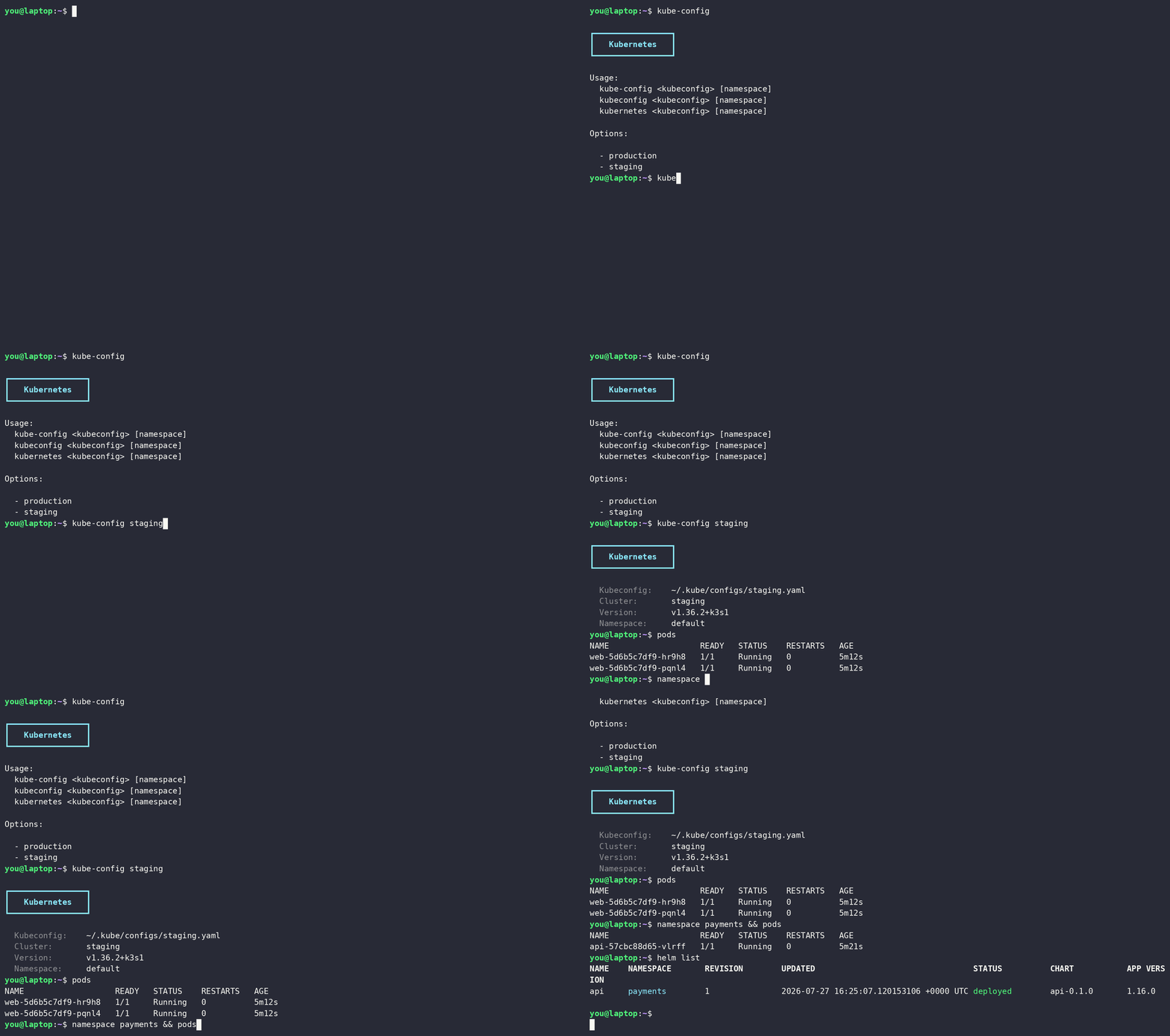
What it does
- Auto-installs and updates kubectl to the latest GitHub release
- Installs kubeseal (Bitnami Sealed Secrets CLI)
- Installs k9s (terminal UI for Kubernetes)
- Installs Helm and keeps the helm-diff plugin up to date
- Registers
kubectl,helm,helm-diff,kubeseal, andk9sin~/.versions.d/soversionsreports their versions - Bash tab completion for kubectl
- Creates
~/.kube/configs/directory for per-cluster kubeconfigs - Optionally writes a kubeseal client config to
~/.config/kubeseal/kubeseal.yaml - Keeps cluster and namespace selection per-shell (
KUBECONFIG,KUBECTL_NAMESPACE,HELM_NAMESPACE) so terminals never collide, see Per-shell isolation - Shell aliases and functions for common Kubernetes operations
Variables
| Variable | Default | Description |
|---|---|---|
kubernetes_kubectl_version | latest | Pin kubectl to an exact version, or track the newest release |
kubernetes_helm_version | latest | Pin Helm to an exact version, or track the newest release |
kubernetes_helm_diff_version | latest | Pin the helm-diff plugin to an exact version, or track the newest release |
kubernetes_kubeseal_version | latest | Pin kubeseal to an exact version, or track the newest release |
kubernetes_k9s_version | latest | Pin k9s to an exact version, or track the newest release |
kubernetes_kubeseal_tmp_path | /tmp/kubeseal/ | Temporary directory for kubeseal download |
kubernetes_k9s_tmp_path | /tmp/k9s/ | Temporary directory for k9s download |
kubernetes_helm_tmp_path | /tmp/helm/ | Temporary directory for the Helm download |
kubernetes_helm_plugins | (empty) | Extra helm plugins to install, each a mapping with name, url, and optional version; installed when missing and updated on --upgrade |
kubernetes_kubeseal_config | {} | Merged into kubernetes_kubeseal_config_path (skipped when empty) |
kubernetes_kubeseal_config_path | ~/.config/kubeseal/kubeseal.yaml | Destination the kubeseal config is written to; write-through if it is a symlink |
Functions
| Function | Description |
|---|---|
kube-config | Show current cluster info or switch to a named kubeconfig from ~/.kube/configs/ |
kube-namespace | Set the active namespace (injected into all kubectl calls via the kubectl wrapper); validates the namespace exists on the cluster and errors with Namespace not found rather than exporting a name nothing matches |
kubectl | Wrapper that automatically injects --namespace when KUBECTL_NAMESPACE is set |
kube-configs | List available kubeconfigs in ~/.kube/configs/ |
kubectl is a wrapper that injects --namespace
When KUBECTL_NAMESPACE is set (via kube-namespace), the kubectl function appends --namespace to every call that doesn't already pass -n/--namespace, so commands target that namespace rather than the kubeconfig's default.
Per-shell isolation
Cluster and namespace selection lives in environment variables scoped to the current shell, never in the kubeconfig's stored current-context or namespace. kube-config sets KUBECONFIG to a per-cluster file under ~/.kube/configs/, and kube-namespace exports both KUBECTL_NAMESPACE (injected by the kubectl wrapper) and HELM_NAMESPACE (read natively by Helm).
Because nothing is written to a shared config file, every terminal holds its own cluster and namespace and kubectl, helm, and k9s in that shell all agree on it.
That is what lets you run several sessions at once, one terminal on staging payments, another on production default, a coding agent like Claude Code on a third cluster, with no kubectl config use-context race between them. The starship prompt reads the same KUBECONFIG and KUBECTL_NAMESPACE and shows the cluster and namespace (☸ <context> (<namespace>)), so each shell visibly shows the cluster it is on. This is the per-shell context isolation concept applied to Kubernetes.
# terminal 1
$ kube-config staging && kube-namespace payments
$ pods                 # staging / payments
$ helm list            # staging / payments, same shell, no -n needed

# terminal 2, simultaneously and unaffected
$ kube-config production && kube-namespace default
$ pods                 # production / default
A coding agent can undo this with one raw command: doctl kubernetes cluster kubeconfig save, gcloud container clusters get-credentials, aws eks update-kubeconfig, and kubectl config use-context all write into whatever KUBECONFIG names and switch its current context. Claude Code's auto mode waves them through, since fetching credentials looks harmless, so deny them in your own config through the claude role's claude_code_permissions_extra, which appends to the shipped deny list. The agent then falls back to kubernetes <name>, doctl-kubeconfig, and gcloud-kubeconfig, or asks:
claude_code_permissions_extra:
  deny:
    - "Bash(doctl kubernetes cluster kubeconfig save*)"
    - "Bash(gcloud container clusters get-credentials*)"
    - "Bash(aws eks update-kubeconfig*)"
    - "Bash(kubectl config use-context*)"
    - "Bash(kubectl config set-context*)"
Aliases
| Alias | Command | Description |
|---|---|---|
| Kubeconfig | ||
kubeconfig | kube-config | Switch to a named kubeconfig |
kubernetes | kube-config | Alias for kube-config |
kube-contexts | kubectl config get-contexts | List contexts |
kube-clusters | kubectl config get-clusters | List clusters |
| Namespaces | ||
namespace | kube-namespace | Bare: list namespaces; namespace <name>: switch the active namespace (name completion) |
kube-namespaces | kubectl get namespaces | List namespaces |
| Nodes | ||
nodes | kubectl get nodes | List nodes |
kube-nodes | kubectl get nodes | List nodes |
nodesw | nodes --watch | Watch nodes |
nodestopcpu | kubectl top node --sort-by='cpu' | Top nodes by CPU |
nodestopmemory | kubectl top node --sort-by='memory' | Top nodes by memory |
| Pods | ||
pods | kubectl get pods | List pods |
podsw | pods --watch | Watch pods |
podsclean | Delete all failed pods across namespaces | Remove failed pods |
podstopcpu | kubectl top pod --sort-by='cpu' | Top pods by CPU |
podstopmemory | kubectl top pod --sort-by='memory' | Top pods by memory |
| Resources | ||
deployments | kubectl get deployments | List deployments |
services | kubectl get services | List services |
secrets | kubectl get secrets | List secrets |
configs | kubectl get configmaps | List ConfigMaps |
ingresses | kubectl get ingresses | List ingresses |
| Events & Logs | ||
events | kubectl get events --sort-by='.lastTimestamp' | List events by time |
eventsw | events --watch | Watch events |
logs | kubectl logs | Tail pod logs |
logsf | logs --follow | Follow pod logs |
| Shorthand | ||
kube | kubectl | Kubectl alias |
Helm plugins are managed for you
Helm and the helm-diff plugin are installed and updated automatically by this role. No manual helm plugin install step is needed. Add your own to kubernetes_helm_plugins:
kubernetes_helm_plugins:
  - name: secrets
    url: https://github.com/jkroepke/helm-secrets
  - name: s3
    url: https://github.com/hypnoglow/helm-s3.git
    version: v0.16.0
Troubleshooting
A command targeted an unexpected namespace
The kubectl function injects --namespace whenever KUBECTL_NAMESPACE is set (via kube-namespace), so a stale value sends commands to the wrong namespace. Check the current value with echo $KUBECTL_NAMESPACE and clear it with unset KUBECTL_NAMESPACE, or call the binary directly with command kubectl … to bypass the wrapper for a single call.